Website Speed Is No Longer Optional: How a Slow Website Affects SEO, Google Rankings and Sales
Your website loads quickly.
Or does it?
One of the biggest mistakes business owners can make is opening their website on a laptop, seeing it appear almost instantly and assuming everything is fine.
Your customers may be having a very different experience.
They could be visiting from a mobile phone, using mobile data, sitting on a train or simply using an older device. A website that appears incredibly fast on your office broadband can perform very differently under those conditions.
We recently saw exactly this with one of our own clients.
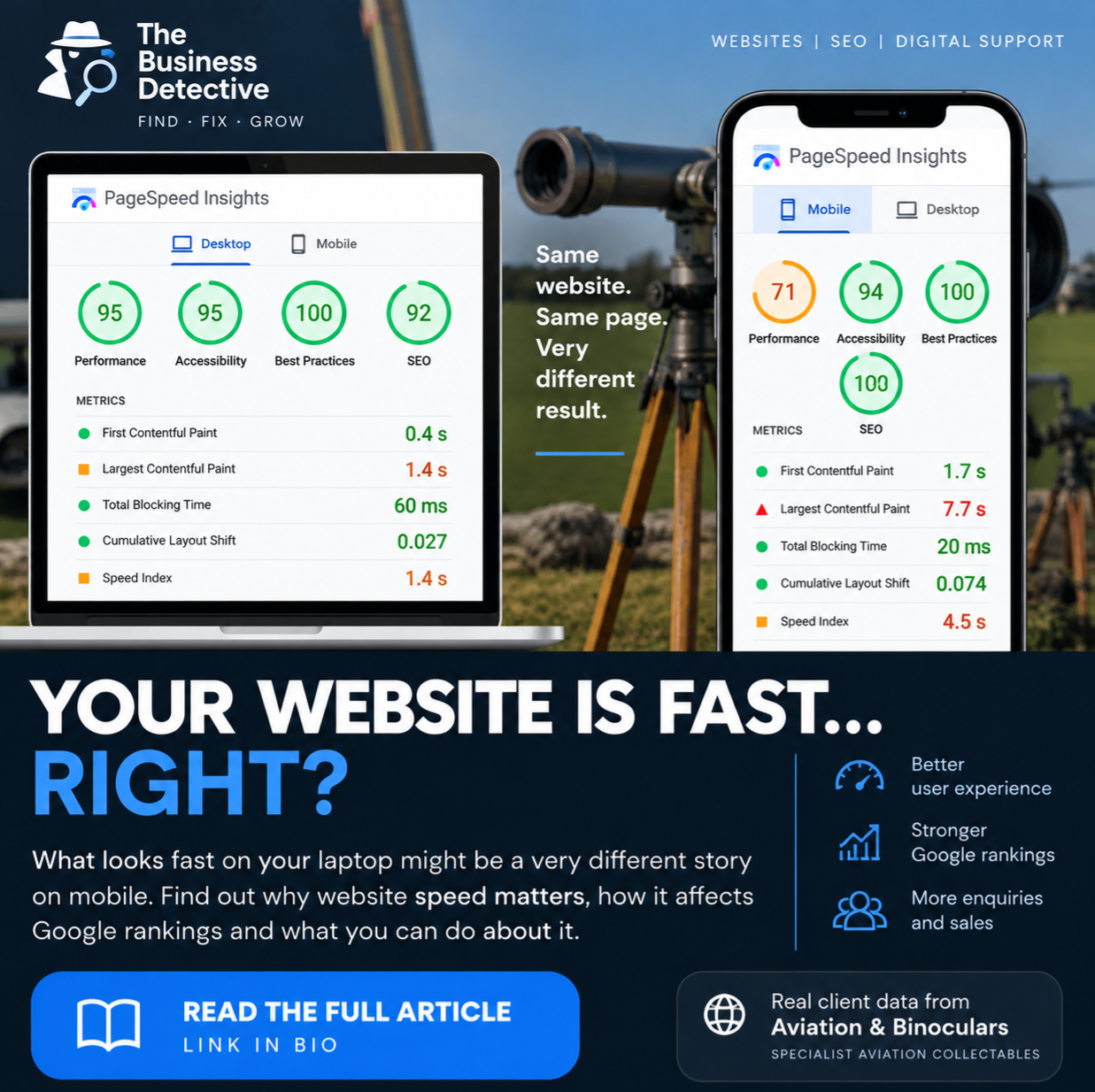
A Google PageSpeed Insights test produced an excellent 95/100 desktop performance score.
The same website scored 71/100 on mobile.
Even more interestingly, its Largest Contentful Paint increased from 1.4 seconds on desktop to 7.7 seconds on mobile.
Same website. Same page. Very different experience.
This is why website speed is no longer something businesses can afford to ignore.
Why Does Website Speed Matter?
Website speed affects much more than how quickly a page appears.
It can influence user experience, customer confidence, engagement, conversions, mobile usability and SEO performance.
Ultimately, it can affect how effectively your website generates enquiries and sales.
Google also considers page experience as part of its search ranking systems, with Core Web Vitals providing important measurements of loading performance, responsiveness and visual stability.
That doesn’t mean Google automatically removes a website from its search results because a page takes a few seconds to load.
SEO is much more complicated than that.
Google still wants to provide the most useful and relevant answer to somebody’s search.
However, imagine Google has several highly relevant websites capable of answering the same query.
One provides a fast, stable and responsive experience.
Another is slow, jumps around while loading and makes visitors wait before they can interact with it.
Which provides the better experience?
Website performance therefore needs to be considered alongside content quality, relevance, authority, technical SEO and usability.
Does Google Punish Slow Websites?
You’ll frequently see headlines claiming:
“Google penalises slow websites.”
The reality is slightly more complicated.
There isn’t a simple rule where a website taking four seconds to load receives a specific ranking penalty.
Google uses multiple signals when determining search rankings, and Core Web Vitals form part of the wider page experience picture.
Achieving perfect Core Web Vitals doesn’t guarantee a number-one Google ranking either.
A lightning-fast website containing poor or irrelevant content isn’t automatically going to outrank a slower authoritative website containing exactly what somebody is searching for.
However, there’s another consequence that has nothing to do with Google’s algorithms.
Your customers can punish a slow website themselves – by leaving.
What Happens When Your Website Takes Too Long to Load?
Think about your own browsing habits.
You search Google.
You click a result.
Then you wait.
The page remains blank.
An image slowly appears.
You try to scroll.
Something moves.
You press a button and nothing seems to happen.
What do you do?
For many people, the answer is simple.
Go back to Google and try another result.
For a business, that’s potentially a lost customer.
And you’ve already done the difficult part.
Your SEO, Google Business Profile, social media, advertising or referral activity successfully brought that person to your website.
Then the website lost them.
That’s why we don’t consider speed purely a technical SEO metric at The Business Detective.
Website speed is a business performance issue.
What Does the Data Tell Us About Website Speed?
Google has previously published research examining how increasing mobile page-loading times affected the probability of somebody leaving a website.
The research found that, compared with a page loading in one second, as loading times increased:
From 1 to 3 seconds, the probability of a bounce increased by 32%
From 1 to 5 seconds, it increased by 90%
From 1 to 6 seconds, it increased by 106%
From 1 to 10 seconds, it increased by 123%
The research predates today’s Core Web Vitals framework, so these percentages shouldn’t be treated as guaranteed bounce rates for every modern website.
But the underlying message remains extremely relevant.
People don’t like waiting.
If you’re investing money and time in SEO, Google Ads, social media or other marketing to generate website traffic, improving the experience of the people already reaching your website can be just as important as finding more visitors.
What Are Google’s Core Web Vitals?
Google’s Core Web Vitals are designed to measure important aspects of the experience somebody receives when using a website.
Three measurements are particularly important.
Largest Contentful Paint (LCP)
Largest Contentful Paint measures loading performance.
Rather than simply measuring when everything on a page has finished loading, LCP looks at how quickly the largest visible content element appears.
Depending on the website, that could be a large hero image, banner, product photograph or block of text.
Google recommends an LCP of 2.5 seconds or less for a good user experience.
Interaction to Next Paint (INP)
Interaction to Next Paint measures responsiveness.
In simple terms:
When somebody interacts with your website, how quickly does the website respond?
This matters for things such as menus, buttons, filters and other interactive elements.
Google recommends an INP of 200 milliseconds or less for a good experience.
Cumulative Layout Shift (CLS)
Cumulative Layout Shift measures visual stability.
You’ve probably experienced a website where you’re about to press a button and suddenly an image loads, everything moves and you press the wrong thing.
That’s the sort of experience CLS helps identify.
Google considers a CLS score of 0.1 or less good.
Together, these measurements provide far more useful information than simply asking:
“Does my website feel fast on my computer?”
A Real Example: Aviation & Binoculars
One of our own clients provides an excellent example of why website performance should be tested across different devices.
Aviation & Binoculars is a specialist UK retailer supplying rare aviation furniture, polished ejection seats, military collectables, WW2 binoculars, Cold War optics and other specialist aviation and military pieces.
The Business Detective has worked with Aviation & Binoculars on a wider programme incorporating website redesign, SEO, content optimisation, technical improvements and user experience.
Technical work has included faster page loading, image optimisation, improved mobile usability, Core Web Vitals improvements, improved crawlability and better website architecture.
So, how fast is the website?
We tested it using Google PageSpeed Insights on 2 September 2026.
The results demonstrate exactly why you shouldn’t rely on a single score.
Desktop PageSpeed Performance: 95/100
On desktop, Aviation & Binoculars achieved:
Performance: 95/100
Accessibility: 95/100
Best Practices: 100/100
SEO: 92/100
The individual performance measurements included:
First Contentful Paint: 0.4 seconds
Largest Contentful Paint: 1.4 seconds
Total Blocking Time: 60 milliseconds
Cumulative Layout Shift: 0.027
Speed Index: 1.4 seconds
These are excellent desktop results.
In particular, the 1.4-second Largest Contentful Paint sits comfortably inside Google’s recommended 2.5-second threshold.
If we’d stopped testing at this point, we might reasonably have concluded:
Job done. The website is fast.
But we didn’t stop there.
Then We Tested Mobile
The mobile PageSpeed Insights test told us something very different.
Aviation & Binoculars achieved:
Performance: 71/100
Accessibility: 94/100
Best Practices: 100/100
SEO: 92/100
The individual measurements were:
First Contentful Paint: 1.7 seconds
Largest Contentful Paint: 7.7 seconds
Total Blocking Time: 20 milliseconds
Cumulative Layout Shift: 0.074
Speed Index: 4.5 seconds
Immediately, one figure stands out.
Largest Contentful Paint: 7.7 seconds
Google’s recommended target for a good LCP is 2.5 seconds or less.
Interestingly, several other aspects of the mobile performance were strong.
Total Blocking Time was only 20 milliseconds.
Cumulative Layout Shift was 0.074.
First Contentful Paint was 1.7 seconds.
But something associated with the largest visible element was taking significantly longer to appear during Google’s simulated mobile test.
And that’s valuable information.
Instead of simply saying:
“The website needs to be faster.”
We now have a specific performance issue to investigate.
Your Website Isn’t Fast Just Because It Feels Fast to You
This is perhaps the most important lesson from our test.
Imagine we’d only tested Aviation & Binoculars on desktop.
We’d have seen:
95/100.
Green circle.
Excellent performance.
Move on.
But a potential customer isn’t necessarily sitting at a desktop computer connected to fast broadband.
Google’s Lighthouse mobile test simulates a much more challenging mobile environment.
Under those conditions, a weakness appeared.
This is why technical SEO needs investigation rather than assumptions.
Reports aren’t there simply to produce impressive-looking numbers.
They’re there to uncover opportunities.
What Would We Investigate Next?
A 7.7-second Largest Contentful Paint doesn’t mean we should start randomly changing things on the website.
We investigate first.
One of the first areas to examine would be the largest content element displayed towards the top of the page.
Questions might include:
Is the hero image too large?
Is it being served in the most appropriate image format?
Is the correct image size being delivered to mobile devices?
Is the image being prioritised correctly?
Is CSS or JavaScript delaying its appearance?
Could the mobile version of the hero section be delivered more efficiently?
This is where tools such as Google PageSpeed Insights become valuable.
They don’t simply give us a score.
They give us evidence about what to investigate next.
Our approach is straightforward:
Measure → Identify → Improve → Test Again
That’s much more useful than chasing a perfect PageSpeed score simply for the sake of achieving 100/100.
What About the Business Results?
This is where the Aviation & Binoculars example becomes particularly interesting.
Website performance hasn’t been worked on in isolation.
It forms part of a much wider website and SEO strategy.
Within approximately 12 months, recorded results include:
Approximately 600–800% growth in organic traffic
Organic visits increasing from around 50 per month to between 350 and 450 per month
A 27.47% increase in clicks
More than 60% growth in enquiries
Approximately 35% year-on-year growth in sales
The website has also achieved number-one rankings for specialist commercial searches including “Big Eye Binoculars” and “Polished Ejection Seats”.
Did website speed alone produce those results?
No.
And we’d never claim that it did.
The improvements came from combining multiple areas of digital marketing, including website design, technical SEO, keyword research, category optimisation, improved product content, internal linking, schema implementation, better navigation, image optimisation and ongoing SEO.
Website performance is one component of that strategy.
But that’s precisely the point.
You don’t want technical performance becoming the weak link in otherwise excellent marketing.
If you’re successfully increasing Google visibility and bringing hundreds more potential customers to a website, you also need to make sure the website they arrive at provides the best possible experience.
What Commonly Makes a Website Slow?
There isn’t one universal cause of poor website performance.
However, there are several things we regularly look at when investigating website speed.
Oversized Images
Modern phones and cameras create enormous image files.
Uploading these directly to a website without resizing or compressing them can force visitors to download considerably more data than necessary.
Images should be appropriately sized, compressed and delivered in suitable formats.
Poor or Unsuitable Hosting
Your website needs an appropriate technical environment behind it.
Hosting isn’t simply somewhere your website lives.
Server performance, caching and the resources available to your website can all affect how quickly content is delivered.
The cheapest hosting option isn’t necessarily the cheapest in the long term if poor performance contributes to lost enquiries.
Too Many WordPress Plugins
Plugins aren’t inherently bad.
They provide some incredibly useful functionality.
But websites can accumulate plugins over several years, some of which may no longer be required.
Plugins can also introduce additional scripts, database requests and resources.
Regular website management should therefore include reviewing what’s actually necessary.
Heavy Website Design
Video backgrounds, large sliders, animations and complicated visual effects can look impressive.
But every design decision should have a purpose.
Ask:
Does this help the customer?
If something adds significant loading time without improving the customer journey or helping generate an enquiry, it may be worth reconsidering.
Third-Party Scripts
Analytics tools, advertising platforms, chat systems, tracking software and social media integrations can all introduce additional resources.
That doesn’t mean removing useful business tools.
It means understanding their performance impact and making informed decisions.
How Can You Check Your Own Website?
One of the easiest places to start is Google PageSpeed Insights.
Enter your website URL and Google will provide information about its performance.
But there’s one important rule:
Test both mobile AND desktop.
Don’t stop because you’ve seen a green score.
And don’t only test your homepage.
Consider testing your:
Homepage
Main service pages
Important product or category pages
Popular blog articles
High-traffic landing pages
Pages generating enquiries or sales
Look beyond the overall performance score too.
Pay particular attention to Core Web Vitals and the recommendations provided within the report.
Google Search Console can also provide Core Web Vitals information across groups of URLs, helping identify wider problems affecting sections of a website.
At The Business Detective, reviewing Core Web Vitals forms part of our wider technical SEO approach alongside areas such as indexing, redirects, sitemaps, crawlability and other technical issues.
Don’t Become Obsessed With Getting 100/100
There’s another side to website performance.
PageSpeed scores can become addictive.
You get 89.
You want 90.
Then you get 95.
You want 100.
But there’s an important question to ask:
What is the business benefit?
A website scoring 98 isn’t automatically better for a business than one scoring 92.
You could spend hours removing useful website functionality simply to gain a few PageSpeed points while making little meaningful difference to your customers.
The objective shouldn’t be:
Get 100/100.
The objective should be:
Build a website that is fast, accessible, stable, easy to use and capable of generating business.
That’s a very different goal.
Website Speed Is No Longer Optional
A slow website can undermine almost everything else you’re doing online.
You could invest in SEO.
Google Ads.
Social media.
Content marketing.
Google Business Profile optimisation.
Email marketing.
All those channels ultimately have a similar objective:
Get somebody to your website and encourage them to take action.
If they arrive and your website makes them wait, some of that investment could be wasted.
Google’s focus on page experience and Core Web Vitals gives businesses another reason to take website performance seriously.
But arguably the more important reason is your customers.
They expect websites to work.
Quickly.
On desktop.
On mobile.
And on connections considerably slower than the broadband in your office.
Our Aviation & Binoculars example demonstrates this perfectly.
Desktop performance: 95/100.
Excellent.
Mobile performance: 71/100.
An opportunity to improve.
That’s not a failure.
That’s exactly what measurement is supposed to uncover.
We now know there’s something worth investigating.
And once we’ve made improvements?
We’ll test it again.
Because good website management isn’t about building a website, launching it and forgetting about it.
It’s about continually measuring performance, identifying opportunities and making improvements that have a genuine business purpose.
At The Business Detective, that’s central to how we approach website design, website management and SEO: finding what’s missing, fixing what’s broken and helping businesses build a stronger online presence.
How Fast Is Your Website Really?
If you’ve only ever checked your website from your own laptop or office broadband, you might not know how it performs for your customers.
The Business Detective can review your website’s speed, mobile performance, Core Web Vitals and wider technical SEO to identify what’s working and where improvements could be made.
Request a website review and let’s find out what’s potentially slowing your website down.